Most people who do SEO never actually stop to think about what happens before their page ranks on Google.
They chase backlinks. They optimize meta tags. They publish content. But they skip the most fundamental question: how does Google even find your page in the first place? And once it finds it, why does it rank your competitor above you?
Here is the truth. If you do not understand how search engines work under the hood, your SEO strategy is built on assumptions. And assumptions cost you traffic, rankings, and revenue.
In this guide, you will learn exactly how search engines work in three clear stages: crawling, indexing, and ranking. You will understand what happens behind the scenes every time someone types a query into Google, and more importantly, what you need to do at each stage to make sure your pages get found, stored, and ranked.
No fluff. No theory for theory’s sake. Just a clear, practical breakdown that will change the way you approach SEO forever.
What Is a Search Engine?
A search engine is a software system that helps users find information on the internet by matching their query to the most relevant pages from billions of websites.
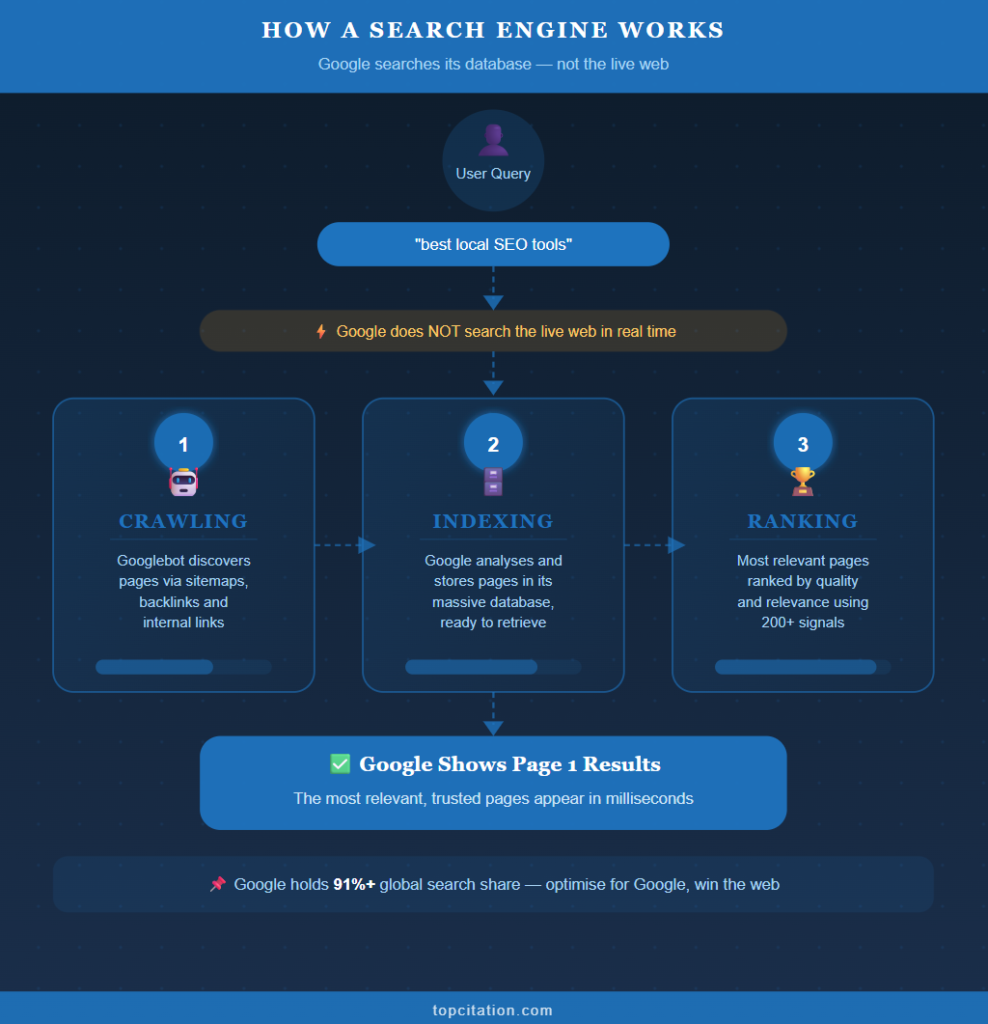
When you type “best local SEO tools” into Google, you are not searching the internet in real time. Google is actually searching its own massive database of web pages that it has already collected and organized. It then instantly shows you the most relevant results from that database.
Think of it like a library. The librarian does not run out and find a new book every time you ask for one. The books are already catalogued, organized, and ready to be retrieved. Google works the same way.
Google dominates search with over 91% of global market share. Bing, Yahoo, DuckDuckGo, and Baidu exist, but for SEO purposes, optimizing for Google means optimizing for the majority of your audience.
Now, how does Google build and maintain this massive library of web pages? It does it through a three stage process that runs continuously, every single day.
Stage 1: Crawling – Google sends out automated bots to discover pages across the web.
Stage 2: Indexing – Google analyses and stores those pages in its database.
Stage 3: Ranking – When a user searches, Google pulls the most relevant pages from its index and ranks them in order of quality and relevance.
Every single SEO decision you make affects one or more of these three stages. That is why understanding this pipeline is not optional. It is the foundation of everything.
Stage 1 – Crawling: How Google Discovers Your Website
Imagine you published a brand new blog post today. You hit publish, share it on social media, and wait. But Google has no idea your page exists yet. So how does it find out?
This is where crawling begins.
Crawling is the process by which Google sends out automated programs called Googlebots (also known as spiders or crawlers) to browse the web and discover new or updated pages. These bots move from link to link, page to page, website to website, collecting information about every URL they visit.
Googlebot is not a single bot. It is a fleet of thousands of automated programs running simultaneously across Google’s servers, crawling millions of pages every single day.
How Does Googlebot Find Your Pages?
Googlebot discovers pages in three main ways.
- Through Sitemaps: A sitemap is an XML file that lists all the important URLs on your website. When you submit your sitemap to Google Search Console, you are essentially handing Google a map of your entire site and saying “here is everything I want you to crawl.”
- Through Backlinks: If another website links to your page, Googlebot follows that link and discovers your content. This is why getting your first backlink from an already indexed site can dramatically speed up your own indexing.
- Through Internal Links: When Googlebot visits one page on your site, it follows all the internal links on that page to discover other pages. This is why a strong internal linking structure is not just good for users. It is critical for crawling.
What Is Crawl Budget and Why Does It Matter?
Crawl budget is the number of pages Googlebot will crawl on your website within a given timeframe. Google does not have unlimited time or resources, so it allocates a crawl budget to each website based on its size, authority, and server performance.
For a small blog with 50 pages, crawl budget is rarely an issue. But for an ecommerce site with 50,000 product pages, crawl budget becomes critically important. If Google only crawls 10,000 of your 50,000 pages, the other 40,000 will never make it into the index, no matter how good the content is.
A real scenario: Imagine an ecommerce store that generates hundreds of filtered URLs like /shoes?color=red&size=10. These are often duplicate or low value pages. If Googlebot wastes its crawl budget on these pages, your most important product and category pages may go uncrawled for days or weeks.
What Blocks Crawling?
Several things can prevent Googlebot from accessing your pages.
- robots.txt: This is a file on your server that tells crawlers which pages or sections they are allowed or not allowed to visit. A misconfigured robots.txt can accidentally block Googlebot from your entire site. This is one of the most common and devastating SEO mistakes.
- Noindex tags: A noindex meta tag tells Google not to index a page. But if Googlebot cannot even crawl the page, it cannot read the noindex tag either. Crawling and indexing are two separate stages.
- Slow server speed: If your server is too slow to respond, Googlebot will abandon the crawl and move on. A consistently slow server signals to Google that your site is not reliable, which reduces your crawl frequency over time.
- Broken internal links: If your internal links point to 404 pages, Googlebot hits a dead end and cannot discover the pages beyond them.
How to Check If Google Is Crawling Your Site
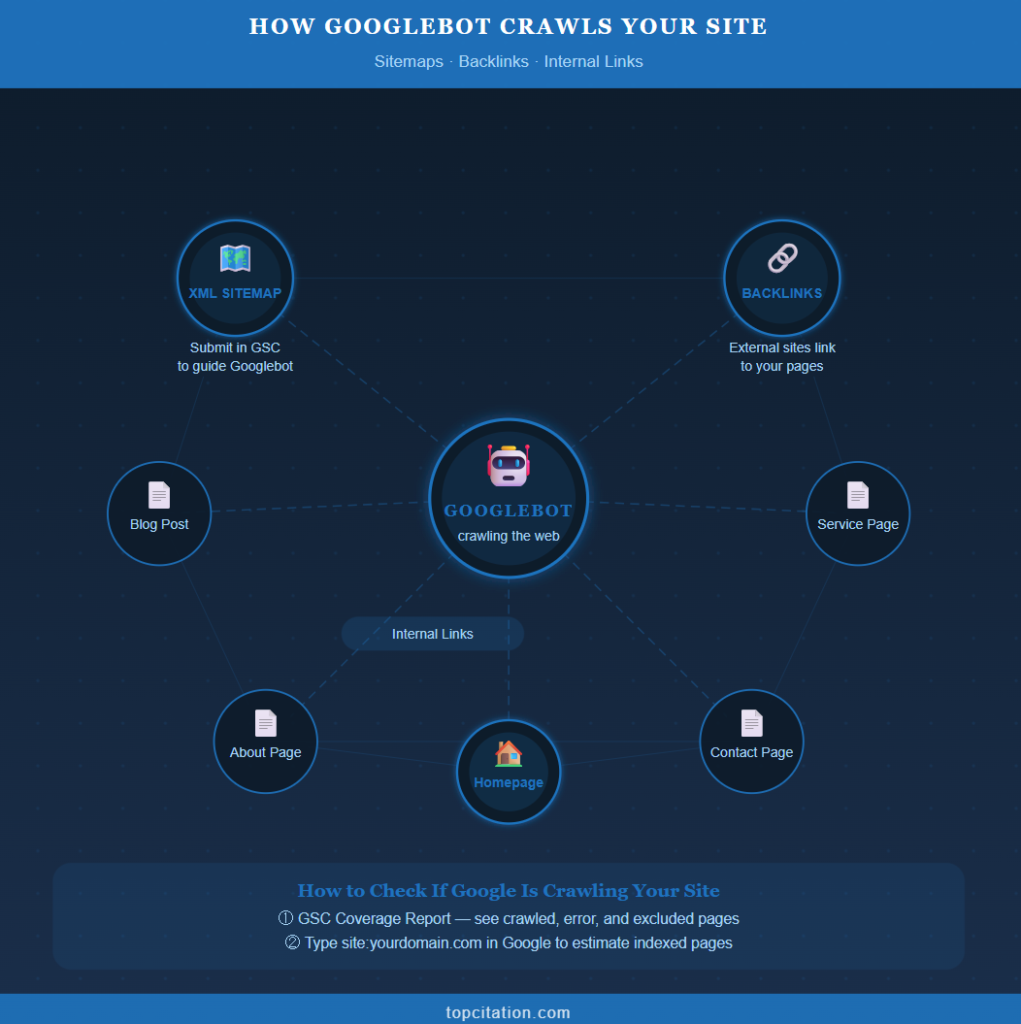
Open Google Search Console and navigate to the Coverage report. This shows you which pages have been crawled, which have errors, and which have been excluded. You can also use the URL Inspection Tool to check the crawl status of any individual page.
Type site:yourdomain.com into Google search. The number of results gives you a rough idea of how many of your pages Google has crawled and indexed.
Related Post: Website Showing on Google But Getting No Clicks? Here’s How to Fix It
Stage 2 – Indexing: How Google Stores Your Content
Crawling gets Google to your page. But crawling alone does not mean your page will appear in search results.
After Googlebot visits your page, Google must decide whether your content is worth storing in its index. This decision is called indexing, and it is where many websites silently lose the SEO battle without even realizing it.
The Google index is essentially a massive database containing hundreds of billions of web pages. When a user searches for something, Google does not browse the live web. It searches this index and pulls the most relevant results in milliseconds. If your page is not in the index, it simply does not exist in Google’s eyes, no matter how good your content is.
Crawled Does Not Mean Indexed
This is one of the most misunderstood concepts in SEO.
Google can crawl your page and still choose not to index it. These are two completely separate decisions. Google crawls to discover. Google indexes to store. And the bar for indexing is much higher than the bar for crawling.
Think of it this way. A librarian can walk through every aisle of a bookstore and pick up every book. But they will only add the genuinely useful, well written, and unique books to the library catalogue. The rest get left behind.
How Does Google Decide What to Index?
After crawling your page, Google analyses its content deeply. It looks at several factors before deciding to add it to the index.
- Content Quality: Is the content original, useful, and detailed? Thin content, duplicate content, and AI spun pages with no real value are frequently skipped or removed from the index.
- Canonicalization: If multiple URLs have similar or identical content, Google picks one as the canonical (primary) version and indexes that. The others may be ignored. This is why setting correct canonical tags matters enormously.
- Page Experience: Google evaluates how the page loads, how it looks on mobile, and whether it provides a good user experience even at the indexing stage.
- Structured Data: Pages with properly implemented structured data (schema markup) give Google clearer signals about what the content means. This helps Google index and categorize your page more accurately, and can even lead to rich results in the SERP.
Reasons Google May NOT Index Your Page
This is where many site owners are losing traffic without knowing why.
- Noindex tag: If your page has a <meta name=”robots” content=”noindex”> tag, Google will crawl it but will not add it to the index. This is useful for thank you pages or admin pages, but devastating if accidentally applied to important content pages.
- Thin or duplicate content: If your page has very little original content, or if the same content exists elsewhere on your site or the web, Google may decide it is not worth indexing.
- Soft 404s: These are pages that return a 200 OK status code but display a “no results found” or empty page message. Google treats these as low value and often skips them.
- Orphan pages: A page with no internal links pointing to it is extremely hard for Googlebot to discover, and even harder to get indexed. Every important page on your site should be reachable through at least one internal link.
- Crawl budget exhaustion: As discussed in the previous section, if Google uses up your crawl budget on low value pages, your important pages may never get crawled, and therefore never indexed.
How to Check Indexing Status
Google Search Console URL Inspection Tool is the most reliable way to check whether a specific page is indexed. Simply paste your URL into the tool and Google will tell you exactly whether the page is in the index, when it was last crawled, and what the current indexing status is.
You will see one of three results. “URL is on Google” means your page is indexed and eligible to appear in search. “URL is not on Google” means it has not been indexed yet, and the tool will usually tell you why. “URL is on Google, but has issues” means it is indexed but there are problems affecting how it appears in search.
If a page is not indexed, you can use the “Request Indexing” button in the URL Inspection Tool to ask Google to recrawl and reconsider it.
The Role of Structured Data in Indexing
Structured data is code (usually in JSON-LD format) that you add to your page to tell Google exactly what your content is about. For example, a recipe page with structured data tells Google “this is a recipe, the cooking time is 30 minutes, the rating is 4.8 stars.”
This does not directly guarantee indexing. But it helps Google understand and categorize your content far more accurately, which increases the likelihood of your page being indexed and displayed with rich results like star ratings, FAQs, or breadcrumbs in the SERP.
A real scenario: A local SEO agency publishes a detailed guide on citation building. The page has great content but no structured data and no internal links pointing to it. Two months later, it still has not been indexed. Why? Google never found it through internal links, and without structured data, the page gave Google minimal signals about its value and relevance. Adding an internal link from the homepage and implementing Article schema got it indexed within four days.
Stage 3 – Ranking: How Google Decides Position 1 vs Position 100
Your page is crawled. Your page is indexed. Now comes the real competition.
Ranking is the process where Google sorts all indexed pages for a given search query and decides who gets Position 1 and who gets buried on Page 5. This decision happens in milliseconds, and it is based on over 200 ranking signals working together simultaneously.
But do not let that number overwhelm you. Most of your ranking power comes from a handful of core signals.
Content Quality and Relevance
Google’s primary job is to match the user’s search intent with the most relevant, helpful content. Your page must clearly answer what the user is looking for, go deeper than competing pages, and demonstrate real expertise on the topic.
A 500 word shallow article will almost never outrank a well structured, insight rich page, even if it has more backlinks.
Backlinks and Authority
Backlinks are still one of the strongest ranking signals. A link from a trusted, authoritative website tells Google “this page is worth referencing.” More quality backlinks generally means higher authority, which translates to better rankings.
But quality beats quantity every time. One backlink from a reputable industry site is worth more than 50 links from random low quality blogs.
User Experience Signals
Google watches how users interact with your page. If people click your result and immediately come back to Google, that is a bad signal. If they stay, read, and engage, that tells Google your page satisfied the query.
Core Web Vitals, mobile friendliness, and page speed all directly impact rankings, especially after Google’s Page Experience update.
EEAT: Why Google Trusts Some Sites More
EEAT stands for Experience, Expertise, Authoritativeness, and Trustworthiness. Google evaluates not just your content but who is behind it. Author credentials, about pages, accurate information, and external mentions all contribute to how much Google trusts your site.
For topics like finance, health, or legal advice, EEAT is especially critical.
RankBrain and AI in Modern Ranking
Google no longer ranks pages based purely on keywords. RankBrain and BERT are AI systems that help Google understand the meaning and context behind a search query, not just the exact words. This means writing naturally for humans, not stuffing keywords, is now the smarter SEO strategy.
A real scenario: A DR 20 local SEO blog outranks a DR 70 marketing agency for “local citation building guide” because the smaller site had a deeply detailed, experience driven article with real examples, while the larger site had a thin 400 word overview written years ago.
The Full Journey – From URL to Page 1
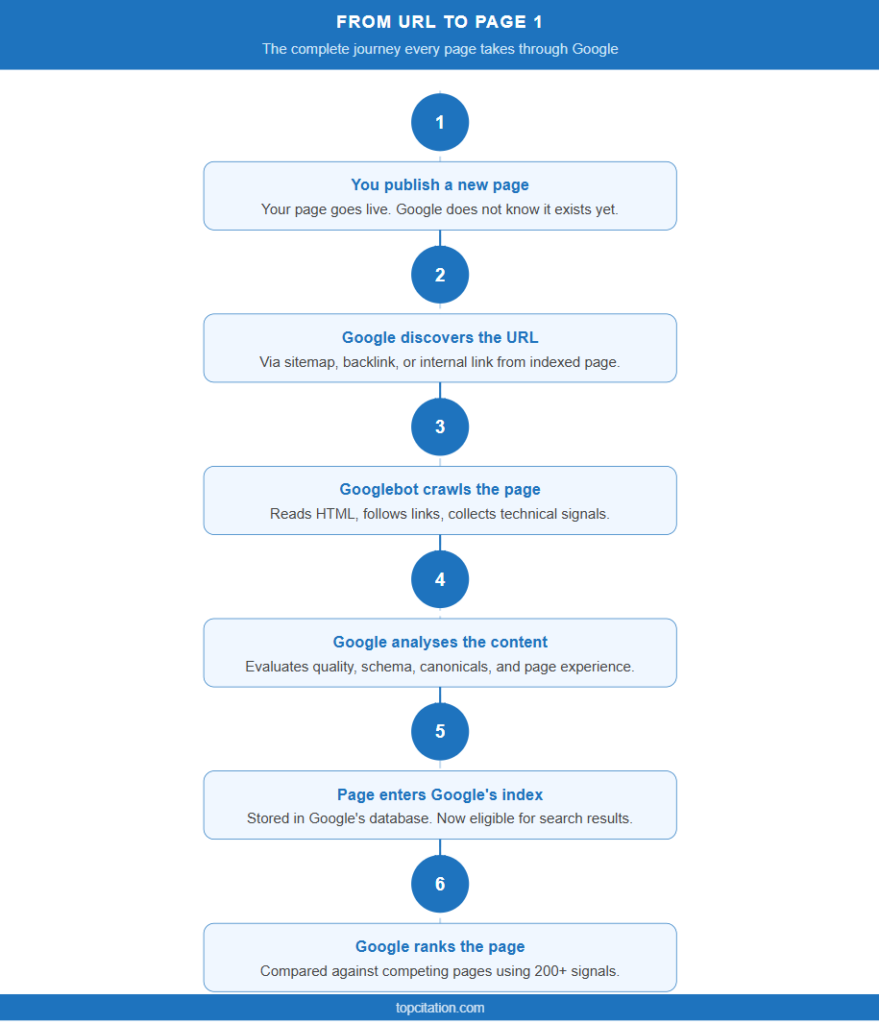
Now that you understand each stage individually, let us put it all together. Here is exactly what happens from the moment you publish a page to the moment it appears in Google search results.
Step 1: You publish a new page Your page goes live on your website. Google does not know it exists yet.
Step 2: Google discovers the URL Googlebot finds your page through your XML sitemap, a backlink from another site, or an internal link from an existing indexed page.
Step 3: Googlebot crawls the page The bot visits your URL, reads the HTML, follows internal links, and collects all content and technical signals.
Step 4: Google analyses the content Google evaluates content quality, originality, structured data, canonical tags, and page experience before deciding whether to index it.
Step 5: The page enters Google’s index Your page is now stored in Google’s database and is eligible to appear in search results.
Step 6: Google ranks the page When a user searches a relevant query, Google compares your page against all competing indexed pages and assigns a position based on its ranking signals.
Step 7: Your page appears in search results If your page wins the ranking battle, it shows up on Page 1. If not, it sits deeper until you improve it.
How Long Does This Take?
For a new website with low authority, this entire journey can take anywhere from a few weeks to several months. For an established site with strong authority and a submitted sitemap, a new page can get crawled, indexed, and ranked within 24 to 72 hours.
Common Mistakes That Break Crawling, Indexing, and Ranking
Most SEO problems are not caused by bad content. They are caused by technical mistakes that silently block Google at one of the three stages. Here are the most common ones.
- Accidentally blocking Googlebot in robots.txt This happens more often than you think. A developer adds a Disallow: / line during site development and forgets to remove it after launch. Result: Google cannot crawl a single page on your site.
- Publishing thin or duplicate content If your page has less than 300 words of original value, or if the same content exists on multiple URLs of your site, Google will likely skip indexing it entirely. Every page must have a clear, unique purpose.
- Orphan pages with no internal links A page that no other page links to is practically invisible to Googlebot. If you want a page indexed and ranked, make sure at least two or three relevant internal links point to it.
- Ignoring Core Web Vitals A slow, unstable page hurts both your crawl frequency and your rankings. Google has made page experience a direct ranking factor, and pages that fail Core Web Vitals consistently rank lower than faster competitors with similar content quality.
- Targeting the wrong search intent You can have a perfectly crawled and indexed page that still never ranks because it does not match what users actually want when they search that keyword. A page targeting “local citations” that reads like a product page will lose every time to a page that answers the question properly.
- Using AI generated content without adding real value Google is increasingly good at identifying content that is generic, surface level, and experience free. Publishing bulk AI content without expert insights, real examples, or original perspectives is one of the fastest ways to get stuck in ranking limbo.
Actionable SEO Checklist: Crawl → Index → Rank
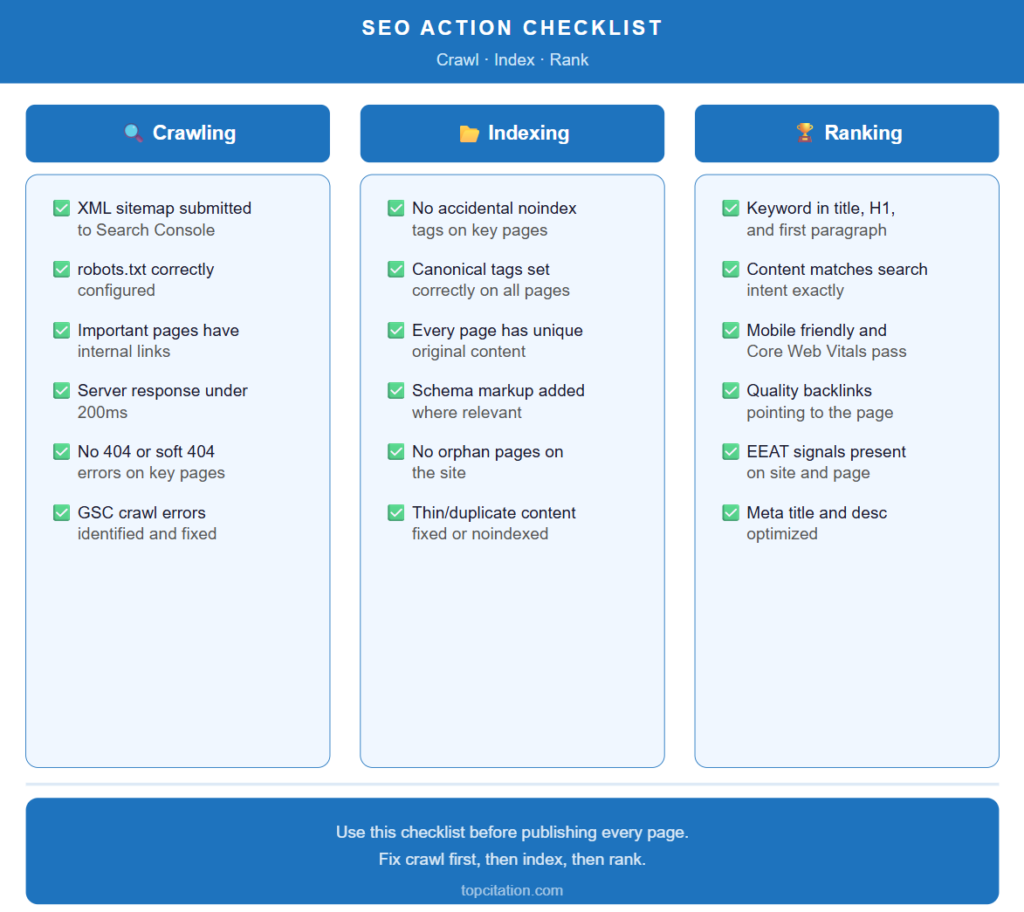
Use this checklist to audit your site at every stage of the search engine pipeline.
Crawling Checklist
✅ XML sitemap is created and submitted to Google Search Console
✅ robots.txt is correctly configured and not blocking important pages
✅ All important pages are reachable through internal links
✅ Server response time is under 200ms
✅ No important pages returning 404 or soft 404 errors
✅ Crawl errors in GSC Coverage report are identified and fixed
Indexing Checklist
✅ No accidental noindex tags on important pages
✅ Canonical tags are correctly set on all pages
✅ Every page has unique, original content with clear value
✅ Structured data (schema markup) is implemented where relevant
✅ No orphan pages — every page has at least two internal links pointing to it
✅ Thin or duplicate content pages are either improved, consolidated, or noindexed
Ranking Checklist
✅ Primary keyword is naturally used in title tag, H1, and first paragraph
✅ Content matches the exact search intent of the target keyword
✅ Page is mobile friendly and passes Core Web Vitals
✅ At least a few quality backlinks point to the page
✅ EEAT signals are present — author bio, accurate information, external mentions
✅ Meta title and meta description are optimized and within character limits
Conclusion
Most people treat SEO like a mystery. They publish content, build a few backlinks, and hope Google notices. But once you understand the three stage pipeline, SEO stops being guesswork and starts being a system.
Crawling is about discoverability. Make it easy for Googlebot to find every important page on your site. Indexing is about worthiness. Give Google a reason to store your page in its database by publishing original, valuable, well structured content. Ranking is about relevance and authority. Earn the trust of both Google and your audience through quality content, strong backlinks, and a great user experience.
These three stages do not work in isolation. A mistake at the crawling stage means your page never gets indexed. A mistake at the indexing stage means your page never gets ranked. And a weak ranking strategy means your perfectly crawled and indexed page sits on Page 5 where no one ever finds it.
The good news is that once you understand where the bottleneck is, fixing it becomes straightforward. Use Google Search Console regularly, audit your site for technical issues, and always create content that genuinely serves your audience.
SEO is not about tricking Google. It is about making Google’s job easier while delivering real value to real people.
Which stage do you think is your biggest bottleneck right now, crawling, indexing, or ranking? Drop your answer in the comments and let us know what you are working on.
Frequently Asked Questions
What is the difference between crawling and indexing?
Crawling is the process of Google discovering your page. Indexing is the process of Google storing and categorising your page in its database. A page can be crawled but not indexed if Google decides the content is not valuable enough to store.
Why is my page not showing up on Google?
There are several possible reasons. Your page may not have been crawled yet, it may have a noindex tag, it may have thin or duplicate content, or it may have no internal links pointing to it. Use the Google Search Console URL Inspection Tool to diagnose the exact issue.
How do I get my page indexed faster?
Submit your URL through Google Search Console URL Inspection Tool and click “Request Indexing.” Also make sure your sitemap is submitted, your page has internal links pointing to it, and your content is original and valuable.
How many ranking factors does Google use?
Google uses over 200 ranking signals, but the most impactful ones are content quality and relevance, backlinks from authoritative sites, page experience and Core Web Vitals, and EEAT signals.
Does page speed affect rankings?
Yes. Page speed is a confirmed Google ranking factor, especially on mobile. Slow pages hurt both your crawl frequency and your position in search results. Google’s Core Web Vitals are the official benchmark for measuring page experience.
What is EEAT and why does it matter for SEO?
EEAT stands for Experience, Expertise, Authoritativeness, and Trustworthiness. It is Google’s framework for evaluating the credibility of a website and its content. Sites with strong EEAT signals tend to rank higher, especially in competitive or sensitive niches.