
You open Google Search Console, and the numbers look promising. Your website is getting thousands of impressions every week. Google is clearly finding your pages, indexing them, and showing them to real people searching for exactly what you offer.
But the clicks? Almost nothing.
This is one of the most common and most frustrating situations in SEO. Your site is technically “on Google” but it might as well be invisible. People see it, scroll past it, and click on someone else. And the worst part is, most website owners try to fix this by creating more content or building more backlinks, when the real problem is sitting right there in their SERP listing, hiding in plain sight.
This guide is going to change how you think about SEO traffic. Not just rankings, but the actual clicks that turn into visitors, leads, and revenue. You will learn exactly why your website is showing on Google but getting no clicks, and more importantly, what to do about it step by step.
Let us start from the foundation.
1. Impressions vs Clicks vs CTR – What These Numbers Actually Mean
Before you can fix a low click problem, you need to understand what you are actually measuring. Most people glance at these three metrics in Google Search Console without truly understanding what each one tells them.
What Is an Impression?
An impression is counted every time your website URL appears in a Google search result page, whether the user sees it or not. If someone searches for “best running shoes for flat feet” and your blog post appears on page 2, that counts as one impression even if the user never scrolls down to page 2.
This is important because impressions can be misleading. A page with 10,000 monthly impressions sounds exciting until you realize most of those impressions are coming from position 40 or 50, where almost no one ever looks.
What Is a Click?
A click is counted when someone actually taps or clicks on your URL in the search results and lands on your page. This is the metric that actually matters for traffic. No click means no visitor, no matter how many impressions you are getting.
What Is CTR and What Is Considered Good?
CTR stands for Click Through Rate. It is calculated as:
CTR = (Total Clicks / Total Impressions) x 100
So if your page gets 1,000 impressions and 30 clicks, your CTR is 3%.
Now here is where most people get surprised. CTR drops dramatically as you move down the search results. Based on multiple large-scale studies and data from sources like Backlinko and Advanced Web Ranking, the average CTR by position looks roughly like this:
Position 1 captures somewhere between 25% to 35% of all clicks for a given keyword. Position 2 drops to around 15%. By position 5, you are looking at roughly 5% to 7%. By position 10, you are lucky to get 2%. And anything beyond page one is essentially getting less than 1% CTR in most cases.
This means ranking on page two or even at the bottom of page one is almost as bad as not ranking at all when it comes to actual traffic.
But here is the critical insight that most SEO guides miss. Even pages sitting at position 1 or 2 can have terrible CTR if the title tag is weak, the meta description is generic, or competitors have rich snippets that make their listings look far more attractive. A page at position 3 with a compelling, well-crafted listing can easily steal more clicks than the page sitting at position 1 with a boring, auto-generated title.
That is the core of this entire problem. Your website on Google but no clicks is not always a ranking problem. Very often, it is a presentation problem.
2. Why Is Your Website Showing But Not Getting Clicks?
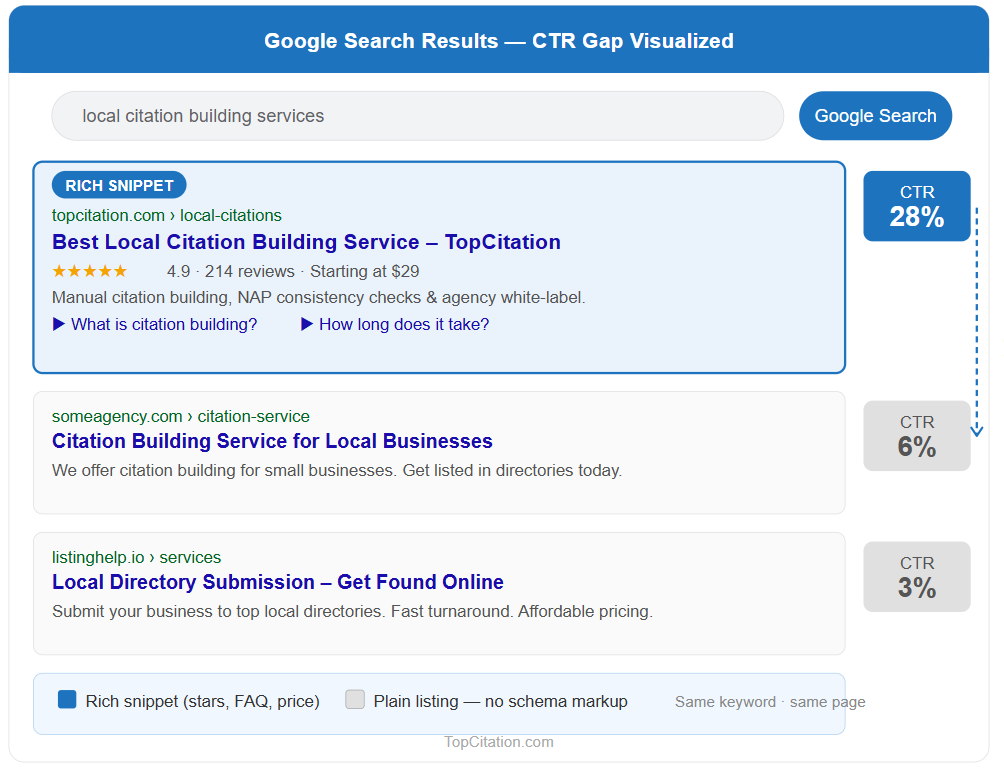
Getting impressions but no clicks means Google trusts your page enough to show it, but users do not trust it enough to click it. These are the most common reasons why.
- Boring or vague title tag. Your title is the first thing users read. If it does not immediately signal value or relevance, they move on. Titles written for bots instead of humans always lose in the click battle.
- Weak meta description. A generic or missing meta description wastes your best micro-ad space. Users scan ten results in seconds. Your description needs to give them a clear reason to choose you over everyone else.
- Ranking too low. Position 6 to 10 gets a fraction of the clicks that position 1 to 3 gets. Strong impressions at low positions is a signal to improve the page, not just optimize the listing.
- Competitors have rich snippets, you do not. Star ratings, FAQs, and review counts in SERP listings attract eyes and clicks. A plain listing simply cannot compete visually against an enhanced one.
- Search intent mismatch. If your page title signals the wrong type of content for what the user actually wants, they will skip you even if you are ranking well.
- No brand recognition. Users click familiar names. An unknown brand at position 2 often loses to a recognized brand at position 4.
Related Post: How Search Engines Work in SEO
3. The 7 SERP Factors That Directly Control Your CTR
Your CTR is not random. It is directly shaped by seven specific factors. Understanding each one gives you a clear action plan instead of guessing what to fix.
1. Position The higher your page ranks, the more clicks it naturally attracts. Position 1 gets roughly 25 to 35% of all clicks for a query. Position 5 gets around 5%. This does not mean you should ignore other factors until you hit position 1. Even at position 3 or 4, a well optimized listing can outperform a lazy position 1 listing.
2. Title Tag Quality Your title is the single highest leverage CTR element you control. It decides in under two seconds whether a user feels “this is exactly what I need” or keeps scrolling. A strong title combines relevance, clarity, and a reason to click. Weak titles get skipped no matter how well the page ranks.
3. Meta Description Meta descriptions do not directly impact rankings but they have a direct impact on clicks. Think of it as a two line advertisement for your page. A description that highlights a clear benefit and ends with a soft call to action consistently outperforms one that just summarizes the page content generically.
4. URL Structure Your URL is visible in the search listing and users do notice it. A clean URL like yoursite.com/website-on-google-no-clicks instantly tells the user the page is relevant and trustworthy. A messy URL with numbers, symbols, or random strings creates subconscious doubt and reduces click confidence.
5. Schema Markup and Rich Snippets Schema markup tells Google additional structured information about your page, which Google can then display as rich snippets in search results. FAQ dropdowns, star ratings, how-to steps, and breadcrumbs all make your listing visually larger and more credible. A listing with rich snippets stands out immediately on a page full of plain text results.
6. Brand Familiarity Users are far more likely to click a name they recognize. If someone has visited your site before and found it helpful, they will choose your result over a higher ranking unknown site. This is why brand building and SEO are not separate strategies. They work together to compound your CTR over time.
7. Device Type Mobile and desktop SERPs display differently. Title tags that look complete on desktop often get cut off on mobile. Since the majority of searches now happen on mobile devices, your titles and descriptions need to be tested and optimized for smaller screens specifically, not just desktop previews.
4. How to Write Title Tags That Actually Get Clicks
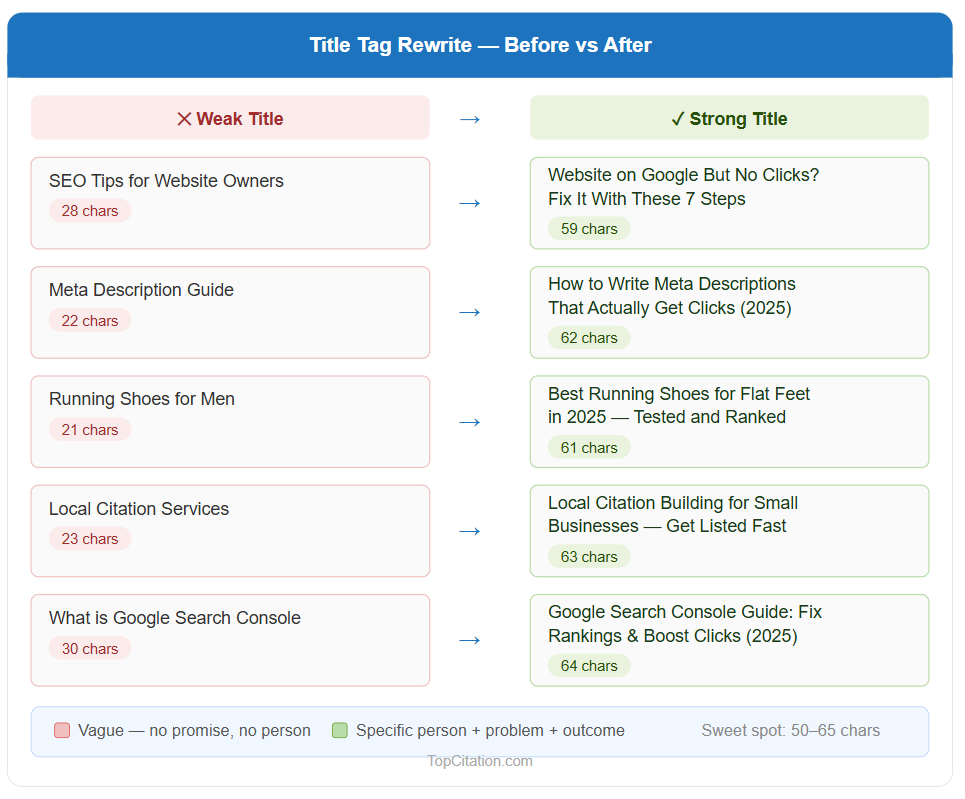
Your title tag is the most important real estate in your entire SERP listing. It is the first thing a user reads and the primary reason they click or scroll past. Most websites treat title tags as an afterthought, stuffing in keywords and calling it done. That approach is exactly why so many pages sit on Google with thousands of impressions and almost no clicks.
The Anatomy of a High CTR Title
A strong title tag does three things simultaneously. It includes the primary keyword so Google and the user both understand the topic. It communicates a clear benefit or outcome so the user knows what they will get. And it creates enough curiosity or urgency that the user feels compelled to click right now instead of checking another result first.
Power Words, Numbers, and Brackets That Work
Numbers in titles dramatically improve CTR because they signal specificity and structure. “7 Ways to Fix Low CTR” performs better than “Ways to Fix Low CTR” because the user knows exactly what format to expect.
Power words like “Exactly,” “Proven,” “Finally,” and “Stop” trigger an emotional response that generic titles cannot.
Brackets and parentheses are another underused trick. Adding something like (With Examples) or [2026 Guide] at the end of a title sets expectations clearly and filters in the right audience.
Studies from HubSpot and Moz have shown that titles with brackets consistently outperform titles without them.
Title Length and Truncation
Google typically displays around 50 to 60 characters of a title tag before cutting it off with “…” on desktop. On mobile it can be even shorter. If your most important keyword or benefit gets truncated, the user never sees the most compelling part of your title.
Always front load your titles with the most important information. Put the keyword and the hook at the beginning, not the end.
The difference is not just style. The stronger titles speak directly to a specific person with a specific problem and promise a specific outcome. That combination is what turns impressions into clicks.
5. Meta Descriptions That Drive Clicks
Most people either ignore meta descriptions completely or write them as a copy paste summary of the page. Both approaches waste one of the most valuable click opportunities you have in the entire SERP.
Why Meta Descriptions Still Matter in 2025
Google sometimes rewrites your meta description by pulling text from your page. But this happens most often when your written description is weak, irrelevant, or does not match the search query well.
When you write a genuinely strong meta description that directly addresses the user’s query, Google uses it as written far more often. That means a well crafted description directly controls how your listing appears to searchers.
Beyond that, even when Google rewrites it, having a strong description trained into your page signals to Google what your page is actually about, which influences which queries trigger your listing in the first place.
The CTA + Benefit Formula
The most effective meta descriptions follow a simple but powerful structure. Lead with the core benefit the user will get from your page. Follow it with one specific supporting detail that adds credibility. Close with a soft but direct call to action that nudges the user to click.
Here is the formula in simple terms:
[Benefit] + [Specific Detail or Proof] + [Call to Action]
Example for this article’s topic: “Find out exactly why your website shows on Google but gets no clicks. Includes a step by step GSC audit, title tag fixes, and schema tips. Start fixing it today.”
That description tells the user what problem it solves, what specific value is inside, and gives them a reason to click now.
Real Examples of Good vs Bad Meta Descriptions
Weak: “This page is about SEO and how to improve your website traffic using Google.” Strong: “Your site has impressions but no clicks? Learn the 7 real reasons why and get a step by step fix checklist you can use today.”
Weak: “We offer the best running shoes for all types of feet and surfaces.” Strong: “Struggling to find running shoes for flat feet? Compare the top 8 picks tested by real runners, with pros, cons, and price breakdowns.”
The weak versions are vague and self centered. The strong versions speak directly to the user’s problem, promise something specific, and create a pull toward clicking.
Character Limit and Preview
Keep your meta description between 140 and 155 characters. Anything longer gets truncated in most SERPs, cutting off your call to action which is usually at the end.
Use Google’s SERP snippet preview tools like Portent’s SERP Preview or Mangools to check exactly how your description will appear before publishing.
6. Schema Markup and Rich Snippets
If you are doing everything right with titles and meta descriptions but still losing clicks to competitors, schema markup is almost certainly the missing piece. Rich snippets change how your listing looks in the SERP and a better looking listing wins more clicks, plain and simple.
What Schema Markup Actually Does
Schema markup is structured data code that you add to your page to help Google understand your content at a deeper level. When Google understands your content better, it can display enhanced information directly in the search results.
That enhanced display is called a rich snippet. It takes up more visual space, looks more credible, and gives users more information before they even click.
The result is that your listing literally stands out on a page where every other result is plain blue text and two lines of gray description.
FAQ Schema
FAQ schema is one of the most powerful CTR boosters available right now. When implemented correctly, it adds two to four expandable questions and answers directly below your main listing in the SERP.
This doubles or even triples the visual space your listing occupies on the page. More space means more visibility, more visibility means more clicks.
FAQ schema works best on blog posts, service pages, and any page that naturally answers common questions about a topic.
How To Schema
How To schema is ideal for tutorial and step by step content. It displays your steps directly in the search result, giving users a preview of your process before clicking.
Users who see the steps and find them relevant are highly motivated to click through for the full details. It also signals to Google that your content is structured, comprehensive, and user focused.
Star Ratings and Review Schema
If you run an ecommerce store, a local business, or a review site, star rating schema is one of the fastest ways to increase CTR. Gold stars in a search listing immediately attract the human eye.
They also signal social proof before the user even visits your page. A listing at position 4 with five gold stars will consistently beat a plain listing at position 2 for click share.
How to Add Schema Without Coding
You do not need to be a developer to implement schema markup. If you use WordPress, plugins like Rank Math and Yoast SEO Premium allow you to add FAQ schema, How To schema, and review schema directly from the post editor without touching any code.
For non WordPress sites, Google’s Structured Data Markup Helper is a free tool that walks you through generating the correct JSON LD code which you then paste into your page’s header.
After adding schema, always test it using Google’s Rich Results Test tool to confirm it is valid and eligible for display in search results.
7. How to Use Google Search Console to Find Your Low CTR Pages
Most people open Google Search Console, look at the total clicks number, and close it. That is like checking your bank balance and ignoring every individual transaction.
GSC contains extremely specific data that tells you exactly which pages are bleeding impressions without converting them into clicks. You just need to know where to look.
Step by Step GSC Walkthrough
Open Google Search Console and click on “Search Results” under the Performance section in the left sidebar. Make sure all four metrics are toggled on at the top: Total Clicks, Total Impressions, Average CTR, and Average Position.
By default GSC shows you the last three months of data. Extend it to six months for a more reliable picture.
Now click on the “Pages” tab below the graph. This switches the view from keywords to individual URLs on your site. What you are looking at now is the performance of each page in Google search.
Filtering High Impressions and Low CTR Pages
Click on the “Impressions” column header to sort pages from highest to lowest impressions. Now look at the CTR column next to each page.
You are hunting for a specific pattern: pages with high impressions but a CTR below 2% or 3%. These are your priority pages. Google is already showing them to thousands of people but almost nobody is clicking.
Make a list of these pages. These are not failing pages. They are actually strong candidates because Google already considers them relevant enough to show. They just need better presentation in the SERP to start converting those impressions into actual clicks.
Understanding Average Position in Context
Once you identify a low CTR page, click on it to drill deeper. Switch to the “Queries” tab to see which specific keywords are triggering that page. Check the average position for each keyword.
If a page has high impressions, low CTR, and an average position between 4 and 10, that is a page where title and meta description improvements will have the most immediate impact.
If the average position is above 15 or 20, the priority shifts toward improving the content itself to push the ranking up first.
Building Your Priority Fix List
Not every low CTR page deserves equal attention. Prioritize pages that have the highest impression volume, sit between position 1 and 10, and target keywords with clear commercial or informational intent.
These pages will give you the fastest and most measurable CTR gains when you improve their title tags, meta descriptions, and schema markup.
8. How to Stand Out in SERPs When Everyone Looks the Same
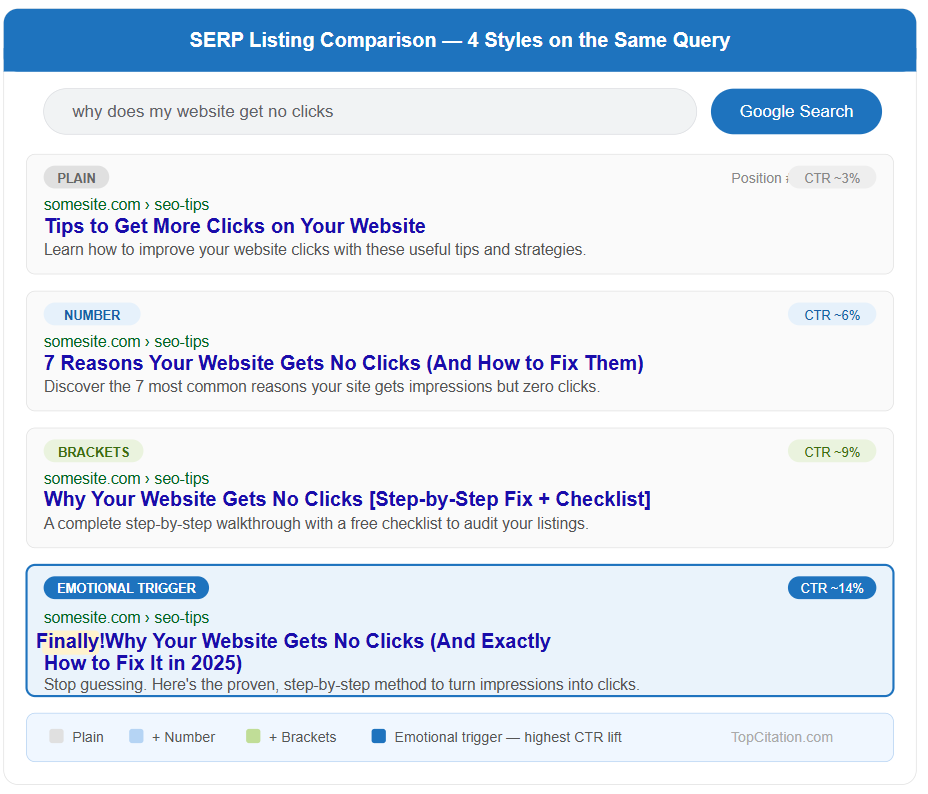
Open any Google search result page and look at the organic listings. Most of them look almost identical. Same format, same length, same tone.
When everything looks the same, users default to clicking the top result or the one that looks slightly different. Your job is to be that slightly different listing, in a way that signals more value and more relevance than everyone around you.
Use Emotional Triggers in Titles
Emotion drives clicks far more than logic does. A title that makes a user feel understood, curious, or slightly urgent will outperform a neutral, purely informational title every time.
Words like “Finally,” “Stop,” “Warning,” “Exactly,” and “Proven” tap into real emotions without being clickbait. The key difference between a good emotional trigger and cheap clickbait is that your page actually delivers what the title promises.
For example, “Why Your Website Gets No Clicks (And Exactly How to Fix It)” speaks directly to a frustrated user and promises a precise solution. That emotional specificity is what separates a 2% CTR from an 8% CTR on the same ranking position.
Use Numbers and the Current Year
Numbers create an expectation of structure and specificity that generic titles cannot match. “7 Reasons Your Website Gets No Clicks” is more clickable than “Reasons Your Website Gets No Clicks” because the number tells the user exactly what they are getting.
Adding the current year like (2025) signals freshness and relevance, which matters especially in fast moving topics like SEO, technology, and digital marketing. Users are far less likely to click a result that feels outdated.
Target Featured Snippets to Own Position Zero
Featured snippets appear above position 1 and capture a significant share of clicks for informational queries. To target them, identify questions your audience asks that your content already answers.
Structure your answer in a clean, direct format: a one or two sentence definition followed by a short numbered or bulleted list.
Google pulls featured snippets from pages that answer questions clearly and concisely, not necessarily from the highest ranking page. This means a page at position 4 or 5 can jump to position zero with the right content structure.
Use Brackets and Parentheses Strategically
Adding context labels at the end of your title in brackets or parentheses consistently improves CTR. Labels like (Step by Step Guide), (With Examples), (Free Checklist), or (2026 Update) set clear expectations for what the user will find.
They also make your listing look more structured and intentional compared to plain titles around it. This small formatting detail signals that your content is organized, specific, and worth the click.
9. Search Intent — The Hidden Reason Your CTR Is Suffering
You can have a perfectly optimized title, a strong meta description, and a decent ranking position, and still get almost no clicks. When that happens, search intent mismatch is almost always the reason. It is the most overlooked CTR killer in SEO and fixing it often produces faster results than any other optimization.
What Search Intent Actually Means
Search intent is the real goal behind a search query. It is not just what the user typed. It is what they actually want to find when they hit enter.
Google has become extremely good at understanding intent, which is why the pages that rank at the top of any SERP almost always match the dominant intent for that query, even if they are not the most keyword optimized pages on the web.
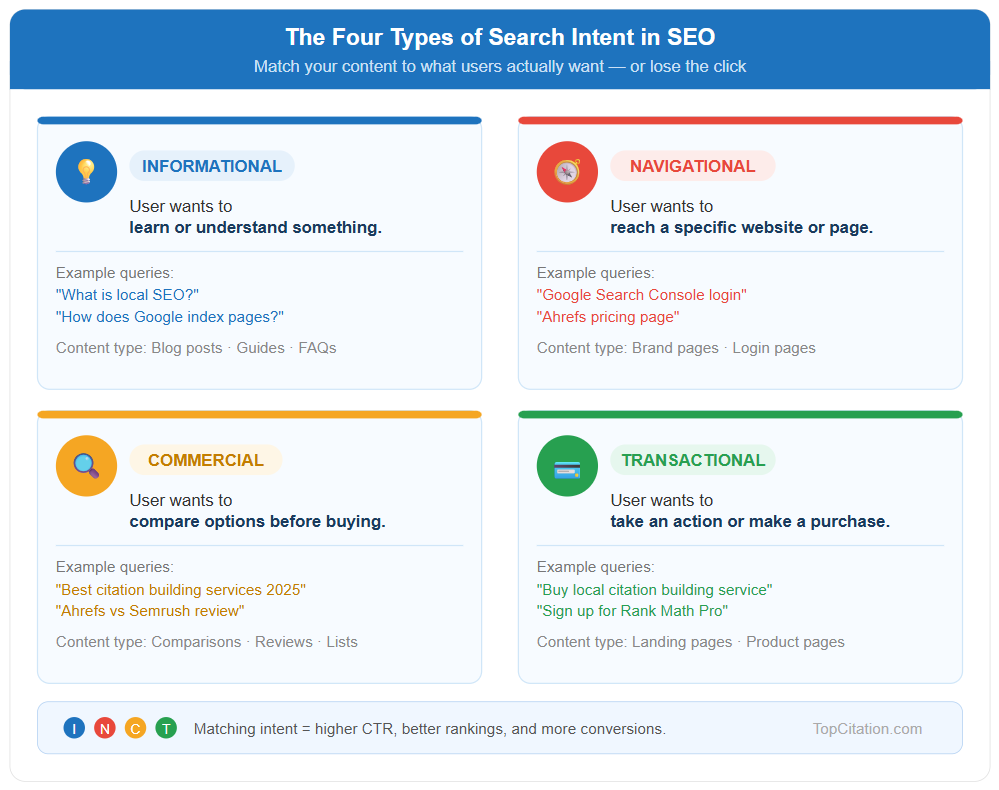
The Four Types of Search Intent
- Informational Intent is when the user wants to learn or understand something. Queries like “what is CTR” or “how does schema markup work” fall here. The user is not ready to buy anything. They want knowledge, explanations, and answers. Content that targets informational intent needs to educate first and everything else second.
- Navigational Intent is when the user already knows where they want to go and is using Google to get there faster. Queries like “Google Search Console login” or “Ahrefs keyword explorer” are navigational. These users have a specific destination in mind. Ranking for navigational queries outside your own brand is almost impossible to convert into clicks because the user simply does not want your page.
- Commercial Investigation Intent is when the user is researching options before making a decision. Queries like “best SEO tools 2025” or “Ahrefs vs Semrush” fall here. The user is comparing, evaluating, and shortlisting. Content targeting this intent needs to help users make informed decisions through comparisons, reviews, and honest evaluations.
- Transactional Intent is when the user is ready to take action right now, whether that means buying, signing up, downloading, or contacting. Queries like “buy running shoes online” or “hire SEO consultant” signal high purchase readiness. Pages targeting transactional intent need strong CTAs, trust signals, and a frictionless path to conversion.
How Intent Mismatch Kills Your CTR
Here is a real world example. Imagine you wrote a detailed beginner’s guide to CTR and optimized it for the keyword “website on google but no clicks.
” Your title reads “What Is CTR and Why It Matters for Your Website.” The user searching that query is not looking for a definition.
They are frustrated, they have a specific problem, and they want a fix right now. Your title signals the wrong type of content for their intent, so they skip your listing entirely and click the result that promises a direct solution.
Same keyword, same ranking position, completely different CTR. The only difference is intent alignment.
How to Fix an Intent Mismatch
Go into GSC and look at the queries driving impressions to your low CTR pages. Ask yourself honestly: does my title and meta description match what someone typing this query actually wants?
The fastest way to understand dominant intent for any keyword is to simply search it yourself and study the top five results. If four out of five results are step by step fix guides, your page needs to look and feel like a fix guide to compete for clicks on that query.
10. Common Mistakes That Kill Your Click Through Rate
Most CTR problems are self inflicted. The good news is that mistakes are fixable. Here are the most common ones that silently drain your clicks every single day.
Writing Title Tags Once and Never Touching Them Again
Most website owners write a title tag when they publish a post and never look at it again. Search trends change, competitor listings evolve, and user language shifts over time.
A title that performed well two years ago may be completely outdated today. Treating title tags as a set and forget element is one of the biggest missed opportunities in ongoing SEO.
High performing sites treat title tags as living assets that get reviewed and tested regularly.
Duplicate Title Tags Across Multiple Pages
If multiple pages on your site have the same or very similar title tags, Google gets confused about which page to show for a given query and users get confused about which result to click.
Duplicate titles also dilute your relevance signal, meaning none of your pages rank or click as well as they should. Every page on your site needs a unique, specific title that matches the exact content and intent of that individual page.
Keyword Stuffing in the Title
Cramming three or four keywords into a title tag does not make it more relevant. It makes it look spammy and untrustworthy. Users can instantly sense when a title was written for an algorithm instead of a human.
A title like “Best SEO Tips SEO Guide SEO 2025 Website SEO” will get skipped every single time in favor of a clean, natural title that actually reads like something a real person wrote. Google also increasingly penalizes this approach in how it displays and ranks titles.
No Call to Action in the Meta Description
A meta description without any direction leaves the user with no reason to act. Simply describing what your page covers is passive.
Ending your description with a direct nudge like “See the full breakdown,” “Get the free checklist,” or “Find out exactly why” gives the user a micro push toward clicking. It is a small addition that consistently makes a measurable difference in CTR across almost every type of content.
Ignoring Mobile SERP Preview
The majority of Google searches now happen on mobile devices. Yet most SEO tools show you a desktop preview by default. A title that looks perfectly complete on desktop can get cut off at a critical word on mobile, completely changing its meaning or losing its hook.
Always check how your title and meta description render on a mobile screen before publishing. Tools like Portent SERP Preview and Mangools SERP Simulator show you both views simultaneously.
Writing for Bots Instead of Humans
This is the root cause behind almost every CTR mistake. When you optimize purely for keyword placement and ignore how real humans read and react to your listing, you end up with technically correct but emotionally flat titles and descriptions that nobody wants to click.
Google’s own guidelines emphasize writing for users first. The sites that consistently win clicks write every title and description as if they are speaking directly to one specific frustrated person who needs exactly what that page offers.
11. Quick Win CTR Fix Checklist
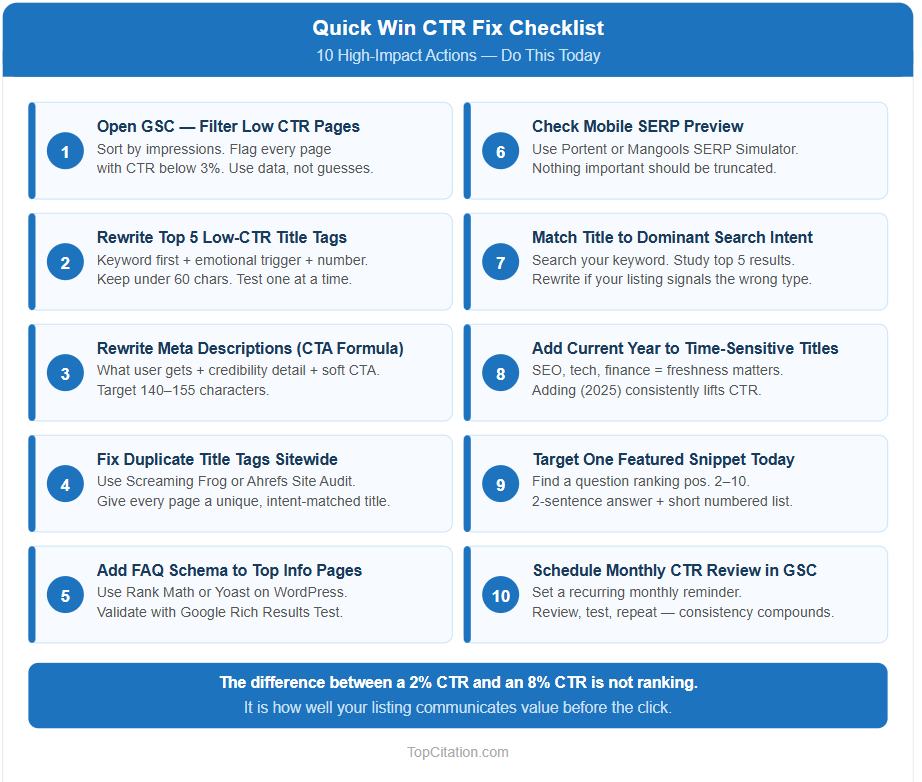
You do not need to overhaul your entire website to start seeing CTR improvements. These are the highest impact actions you can take right now, in order of priority.
1. Open GSC and filter your high impression, low CTR pages. Sort by impressions, identify every page with a CTR below 3%, and make this your working list. Do not guess which pages need fixing. Let the data tell you.
2. Rewrite the title tag of your top 5 low CTR pages. Use the benefit plus hook formula. Front load the keyword, add an emotional trigger or number, and keep it under 60 characters. Test one variation at a time so you can measure what actually moved the needle.
3. Write or rewrite meta descriptions using the CTA plus benefit formula. Every description should state what the user gets, add one specific detail for credibility, and close with a soft call to action. Keep it between 140 and 155 characters.
4. Check for duplicate title tags across your site. Use Screaming Frog free version or Ahrefs Site Audit to identify duplicate or missing titles. Fix every duplicate with a unique, intent matched title.
5. Add FAQ schema to your top informational pages. Use Rank Math or Yoast if you are on WordPress. Add three to four genuinely useful questions and answers. Validate using Google’s Rich Results Test before publishing.
6. Check your mobile SERP preview for every page you optimize. Use Portent or Mangools SERP Simulator. Confirm your title and description are fully visible on mobile and that nothing important gets truncated.
7. Match your title and description to the dominant search intent. Search your target keyword yourself. Look at the top five results. If your listing signals a different content type than what dominates the SERP, rewrite it to align.
8. Add the current year to time sensitive titles. If your content covers SEO, technology, finance, or any topic where freshness matters, adding 2025 to the title signals relevance and consistently improves CTR on competitive keywords.
9. Target at least one featured snippet opportunity. Find a question based query where your page already ranks between position 2 and 10. Restructure your answer as a clean two sentence definition followed by a short numbered list. This is the most reliable path to position zero.
10. Schedule a monthly CTR review in GSC. CTR optimization is not a one time task. Set a recurring monthly reminder to review your performance data, identify new low CTR pages, and test updated titles and descriptions. Consistency here compounds over time.
Conclusion
If your website is showing on Google but getting no clicks, you are not failing at SEO. You are failing at persuasion. Google has already done its job by showing your page to real people searching for exactly what you offer. The missing piece is convincing those people to choose you over everyone else on that page.
The fix is not always about ranking higher. Sometimes it is a single title tag rewrite. Sometimes it is adding FAQ schema that doubles your listing’s visual footprint. Sometimes it is simply aligning your content with what users actually want when they type that query.
Start with Google Search Console. Find your high impression, low CTR pages. Pick the top five and apply everything covered in this guide, better titles, stronger meta descriptions, schema markup, and intent alignment. You will start seeing measurable improvements within two to four weeks as Google recrawls and updates your listings in search results.
SEO traffic is not just about getting found. It is about getting chosen.
Open GSC right now and find your highest impression, lowest CTR page. What does the title tag say? Drop it in the comments and let us know what you changed it to.
FAQs
Why is my website showing on Google but getting no clicks?
Your page is ranking but your title tag, meta description, or SERP listing is not compelling enough to make users choose you over competitors. Fix your title, add schema markup, and align your content with search intent.
What is a good CTR in Google Search Console?
A CTR of 3% to 5% is considered average. Position 1 results typically see 25% to 35% CTR. Anything below 2% on a page with high impressions is a clear signal that your listing needs optimization.
Does meta description affect CTR?
Meta descriptions do not directly affect rankings but they have a direct impact on clicks. A benefit driven description with a clear call to action consistently outperforms a generic one.
What is schema markup and does it really improve CTR?
Schema markup is structured data that helps Google display rich snippets like star ratings, FAQs, and how to steps in your listing. These enhancements make your listing visually stand out and consistently improve CTR.
How do I find low CTR pages in Google Search Console?
Go to Performance, click the Pages tab, sort by Impressions, and look for pages with high impressions but CTR below 3%. These are your priority optimization targets.